Using GitHub (optional)
This section is optional and can be skipped.
GitHub is a popular, proprietary Git hosting service. For open-source alternatives, consider Forgejo, Codeberg, Sourcehut, Gerrit, Tangled, or Radicle .
Authenticating with an SSH Key
Using an SSH key is more secure and convenient than a password for authenticating with GitHub.
- Generate a new key: Follow GitHub's guide on generating a new SSH key.
- Add the key to your account: Follow the guide on adding an SSH key to your GitHub account.
Verify your setup with this command:
ssh -T git@github.com
You should see a success message like: Hi user! You've successfully authenticated...
Creating a New Repository on GitHub
- Go to github.com/new.
- Choose an owner and a repository name.
- Important: If you plan to push an existing local repository, do not initialize the new repository with a
README,.gitignore, or license file. - Click "Create repository".
Cloning an Existing Repository
-
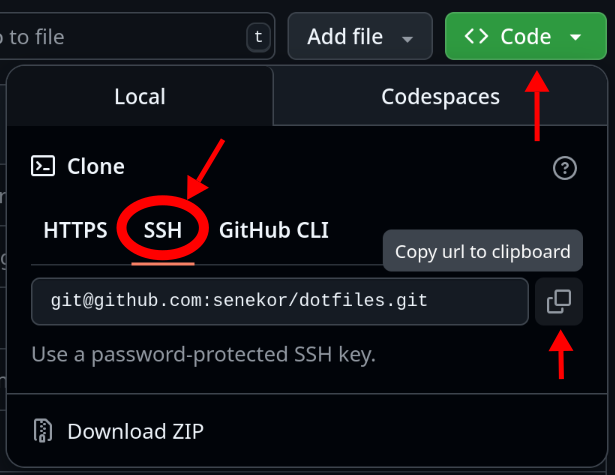
On the repository's GitHub page, click the green "Code" button.
-
Select the SSH tab and copy the URL.
-
Run the clone command in your terminal:
jj git clone <COPIED_URL>